Field Log · English Edition
Deploy an Astro Blog with Railway and Cloudflare: A 30-Second Git Push Workflow (2/3)
In part one (Korean), I described why blocked automation on Tistory and Naver pushed me toward a static site on my own domain. This article is the implementation record that followed. I built a static site with Astro 5, configured Railway to deploy every Git push, and connected the site to my domain through Cloudflare. I also document two incidents—the SPA fallback and broken Korean text in SVG rendering—instead of smoothing them out of the story.
Questions this article answers
- Why Astro instead of Next.js, Hugo, or Jekyll?
- How did I create a path from one Git push to a built and deployed site?
- Which settings did I actually use when connecting a new domain through Cloudflare?
Why Astro? Comparing Next.js, Hugo, and Jekyll
I considered four blog frameworks: Astro, Next.js, Hugo, and Jekyll. I compared them on four axes: static output, MDX support, control over Korean fonts, and compatibility with a Node-based toolchain.
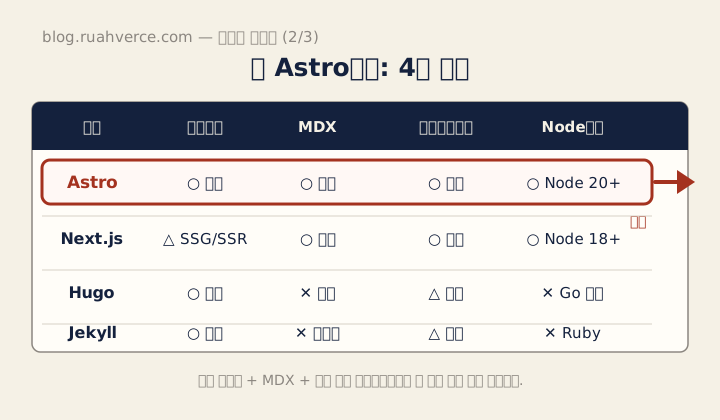
The diagram retains Korean labels. It compares the four candidates on static output, MDX, Korean font control, and Node compatibility; the same comparison is translated below.
| Framework | Static output | MDX | Korean fonts | Toolchain |
|---|---|---|---|---|
| Astro 5 | Default with output: 'static' | Official integration | Fully controllable | Node 20+ |
| Next.js | Available through export | Available through mdx-js | Fully controllable | Node-based |
| Hugo | Strong, Go-based generator | Limited; usually shortcodes | Fully controllable | Independent of Node |
| Jekyll | Standard static generator | No native MDX; uses Liquid | Fully controllable | Ruby-based |
Next.js offered a rich set of features, including server rendering and image optimization, but I was building a content-first static site. Pulling in the full Next build model without needing dynamic routes or server components felt excessive. Hugo is fast, but it does not provide the MDX workflow I wanted. In internal RAG projects, I often need to place interactive components inside Markdown, so the lack of MDX mattered. Jekyll also carried the memory of getting stuck in its Ruby environment a year earlier, as described in part one (Korean).
Astro defaults naturally to static output with output: 'static', and MDX can be added with one command:
npx astro add mdxThe build result is ordinary HTML, CSS, and JavaScript that can be moved to almost any host. That low level of hosting lock-in made the decision.
Five-Minute Setup: From npm create astro to the First Page
Installation starts with:
npm create astro@latestThe interactive setup creates a project with src/pages, src/content, and src/layouts. Running npm run dev serves the first page at http://localhost:4321.
To embed components in Markdown, add the MDX integration:
npx astro add mdxThe command updates astro.config.mjs. The core of my configuration sets the production domain, static output, MDX and sitemap integrations, and Sharp as the image service:
// astro.config.mjs
import { defineConfig } from 'astro/config';
import mdx from '@astrojs/mdx';
import sitemap from '@astrojs/sitemap';

export default defineConfig({
  site: 'https://blog.ruahverce.com',
  output: 'static',
  integrations: [mdx(), sitemap({ filter: (p) => !p.includes('/draft/') })],
  build: { format: 'directory' },
  image: { service: { entrypoint: 'astro/assets/services/sharp' } },
});
build.format: 'directory' generates paths such as /posts/abc/index.html, which produce clean trailing-slash URLs. This setting later becomes relevant to the SPA-fallback incident.
Content Collections: Enforcing a Frontmatter Schema
Frontmatter mistakes accumulate as a blog grows: a missing description, a misspelled tag, or a malformed publication date. Manual review does not scale well.
Astro Content Collections validate frontmatter at build time with a Zod schema. A schema violation fails the build, preventing an invalid article from reaching production.
// src/content.config.ts (core excerpt)
import { defineCollection } from 'astro:content';
import { glob } from 'astro/loaders';
import { z } from 'astro/zod';

const posts = defineCollection({
  loader: glob({ pattern: '**/*.md', base: './src/content/posts' }),
  schema: ({ image }) =>
    z.object({
      title: z.string().min(1),
      description: z.string().min(100, 'The meta description must be at least 100 characters')
                            .max(160, 'The meta description must be at most 160 characters'),
      publishDate: z.coerce.date(),
      tags: z.array(z.string()).min(3).max(7),
      cover: image().optional(),
      series: z.string().optional(),
      seriesOrder: z.number().int().positive().optional(),
      draft: z.boolean().default(false),
    }).refine(
      (d) => !!d.series === !!d.seriesOrder,
      'series and seriesOrder must be set together or both omitted',
    ),
});

export const collections = { posts };
The image() schema helper validates an image reference and exposes metadata. Actual transformation depends on rendering it with Astro’s Image, Picture, or getImage() APIs; merely declaring a cover does not optimize every output or guarantee better Core Web Vitals. See the Astro image guide. refine() checks field relationships. The 100–160 character description constraint is this blog’s own policy, not a search-engine requirement.
The real file also contains fields such as
updatedDate,coverAlt,author, andcanonical. Starting with a small schema and adding operational requirements over time has worked well.
Railway Deployment: Git Push as the Build Trigger
Once the build was stable, I needed a host. Railway can detect and build a Node project without requiring a custom Dockerfile, and it can trigger a new build and deployment on every push to a connected GitHub repository.
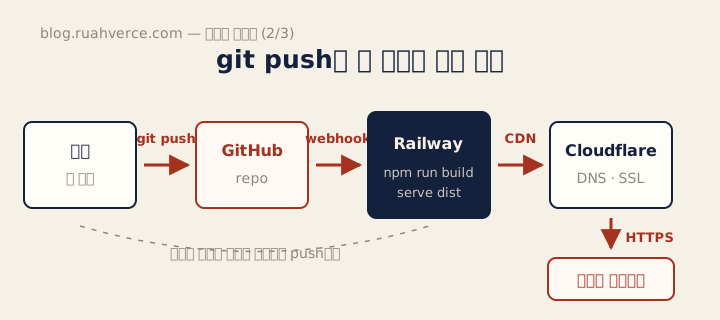
The pipeline is local Git push → GitHub → Railway build → Cloudflare CDN → reader, with no manual step between stages.
I connected the CLI in two steps:
railway login
railway link   # connect the existing project
After connecting the GitHub repository to the Railway project, I described the build and start commands in two files.
# nixpacks.toml
[phases.build]
cmds = ["npm install", "npm run build"]

[phases.setup]
nixPkgs = ["nodejs_20"]

[start]
cmd = "npm run start"
// railway.json
{
"$schema": "https://railway.com/railway.schema.json",
"build": {
"builder": "NIXPACKS",
"buildCommand": "npm install && npm run build"
},
"deploy": {
"startCommand": "npm run start",
"healthcheckPath": "/",
"healthcheckTimeout": 30,
"restartPolicyType": "ON_FAILURE",
"restartPolicyMaxRetries": 10
}
}The corresponding package.json script is:
"scripts": {
  "dev": "astro dev",
  "build": "astro build",
  "start": "serve dist -l ${PORT:-3000}"
}
The serve package exposes the generated dist/ directory. It listens on the $PORT provided by Railway and falls back to port 3000 locally.
Connecting a Personal Domain with Cloudflare
Railway supplies a *.up.railway.app domain. I wanted an independent domain for consistent branding and search identity, so I used Cloudflare Registrar and configured DNS, TLS, and CDN behavior in Cloudflare.
After buying the domain, the setup came down to three actions.
1. Add a DNS record. Create a CNAME—or the record type Railway currently instructs you to use—that points the blog host to the Railway service domain.
I enabled the Cloudflare proxy, shown as the orange cloud, so traffic could pass through Cloudflare’s CDN and edge TLS.
2. Set SSL/TLS mode to Full (strict). This setting is under SSL/TLS in the Cloudflare dashboard.
Railway provides an origin certificate, so strict mode can validate the Cloudflare-to-Railway connection instead of encrypting it without verification.
3. Register the custom domain in Railway. Add blog.ruahverce.com in the Railway service settings.
Railway may ask for an additional verification record. Once that token is added to Cloudflare DNS, the connection can be finalized.
The three steps took less than half an hour in my case. Domain pricing varies by TLD, but Cloudflare Registrar’s at-cost policy kept the .com renewal in the low tens of US dollars per year.
Two Incidents: serve -s and Broken Korean Text in SVGs
The path was not as smooth as the preceding sections might imply. Two failures stopped the deployment, and both remain visible in the commit history.
Incident 1: the SPA fallback from serve -s. My first start script used serve -s dist. The -s or --single option is intended for single-page applications: it sends every unknown route to the root index.html. On this static multi-page site, the result looked like every post redirected to the home page. Visiting /posts/abc/ returned the home document. Astro had already built an HTML file for each route, so no SPA fallback was needed.
The fix was one flag:
- "start": "serve -s dist -l ${PORT:-3000}"
+ "start": "serve dist -l ${PORT:-3000}"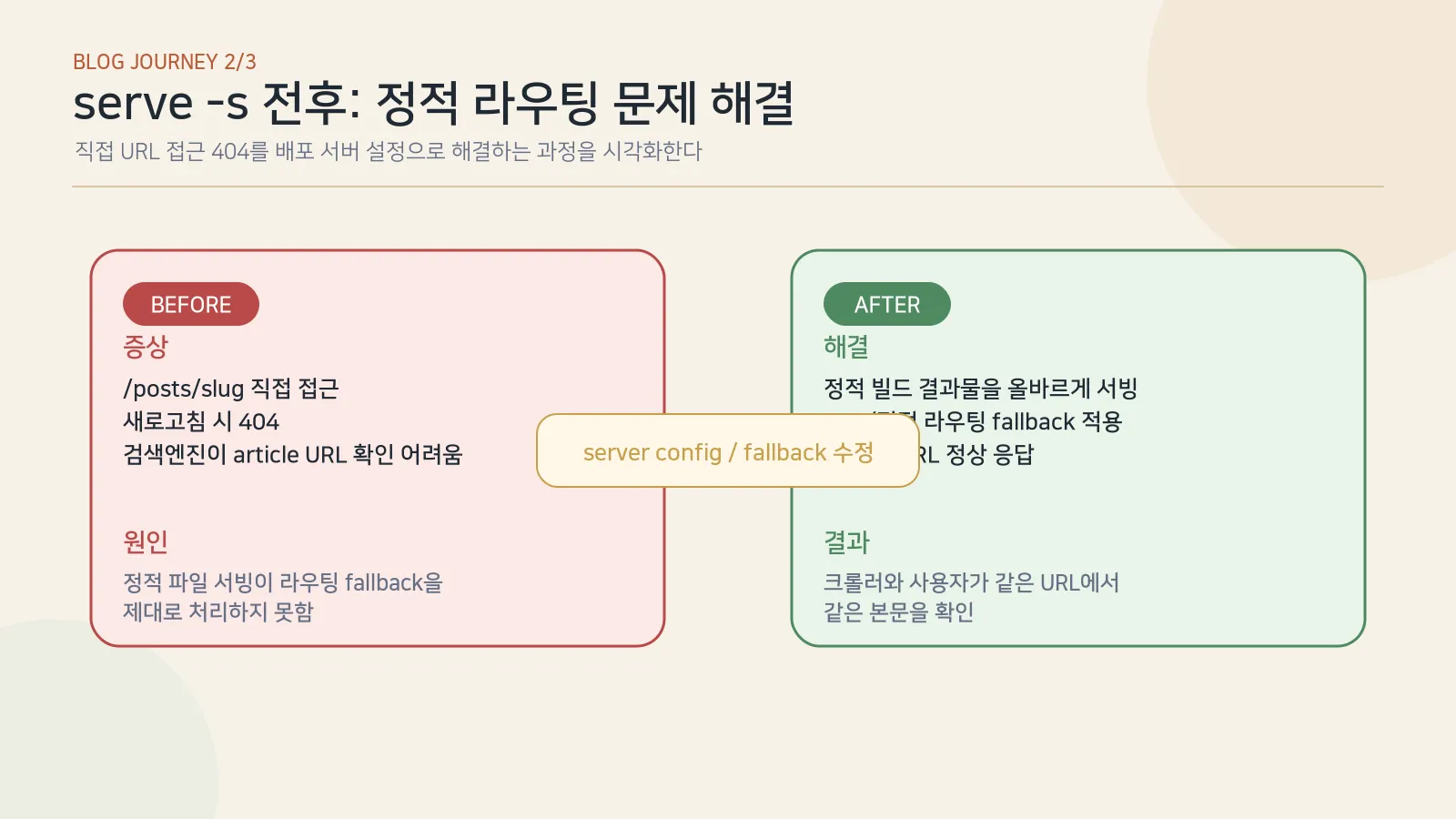
Commit
046aced— fix: remove serve -s SPA fallback that sent post pages to home
Incident 2: Korean text rendered as tofu in OG-card SVGs. When Sharp rasterized the social-card SVGs, every Korean glyph became an empty square. The cause had two layers. First, the SVG requested fonts such as Georgia and Courier New, which do not contain Korean glyphs. Second, the WSL environment had no Korean font registered with Fontconfig, so Sharp could not find a usable fallback.
I standardized the assets on Noto Sans KR, configured Fontconfig, and regenerated the complete set of social images. I had encountered the same failure pattern while rendering multilingual PDF reports with Sharp and headless Chrome at work, so the combination was familiar.
Commit
4599c74— fix: regenerate social assets with Korean font support
Neither incident was fundamentally an Astro bug. They were first-order failures at the static-serving and rasterization boundaries. Knowing to check those boundaries can save several hours when reproducing the stack.
Vibe Coding as an Enabling Condition
As I wrote in part one (Korean), I probably would not have completed this setup a year earlier. I had already stalled in the Jekyll and Ruby environment, and I was unsure which Cloudflare switches were safe defaults. The difference now is straightforward: an AI coding agent can participate in environment setup, debugging, and refactoring.
Without that pairing, each of the two incidents could have consumed half a day. The SPA fallback would have required reading the serve documentation from the beginning. The SVG failure required connecting Fontconfig, Sharp, font coverage, and Noto Sans KR. Pairing with an agent let me narrow the hypotheses quickly and close both incidents within an hour each.
Between doctoral work and a full-time job, the time available for this blog is often one hour before dawn or thirty minutes at lunch. Completing infrastructure work inside those windows is difficult with human attention alone. Building the deployment path within a week with a tool such as Claude Code reinforced the argument from part one: this project became practical because of the tools available at this moment.
The point is not that using an AI agent is impressive. It is that when the cost of entering infrastructure work falls, starting earlier gives content more time to compound.
Operational update, 2026-09-08: This section records the earlier serve-based incident. The current repository starts with
node server.mjs. For a fresh deployment, follow the selected revision’spackage.jsonand server configuration, and verify that a missing article URL does not return the home document with status 200.
Frequently Asked Questions
Q1. Aren’t Vercel and Netlify the more conventional choices?
For a purely static site, Vercel and Netlify are familiar and often smoother choices. I chose Railway because I also wanted to manage long-running Node services—RAG demo APIs, WebSockets, and queue workers—from the same dashboard. Short-lived edge functions and container hosting solve different problems. For static content alone, Vercel or Netlify would be equally valid.
Q2. Wouldn’t Cloudflare Pages be more natural?
Cloudflare Pages is strong for static sites and Workers functions. I still wanted the flexibility of a full Node container for other workloads. Separating the hosting and DNS layers also preserves control: I can move one provider without moving the other. This site therefore uses Railway for hosting and Cloudflare for DNS and CDN deliberately.
Q3. What does a personal domain cost?
Common .com domains are usually in the low tens of US dollars per year. Cloudflare Registrar advertises at-cost registration without a markup. DNS, CDN, and basic TLS are available on Cloudflare’s free plan, subject to its current plan terms.
Q4. Is TLS automatic?
Cloudflare can provision edge TLS when the proxy is enabled, and Railway provisions a certificate for its service and registered custom domains. With Full (strict) mode, the connection is encrypted and validated on both the visitor-to-Cloudflare and Cloudflare-to-Railway segments.
Takeaways
- The stack decision came down to lock-in and control. Astro gave me static output, MDX, and portable build artifacts.
- A Git push can become a deployment through the build, start, and health-check settings in
nixpacks.toml,railway.json, andpackage.json. - The project stopped twice. The causes were an SPA fallback and missing Korean glyphs in the SVG raster pipeline—not Astro itself, but important boundaries in the full system.
The result is the same home page captured in part one (Korean).
The current hero section of this site, built and served by the stack described above.
Next in the Series (3/3)
A newly launched domain may remain difficult to find in Google for its first weeks. The next part covers Search Console and Naver Search Advisor registration, sitemap submission, and the internal-link and series structure used to start the indexing conversation.
References
Reader questions
읽으며 남긴 질문
글을 읽으며 붙잡아 둔 질문입니다. 다시 살펴보거나, 보내지 않은 질문을 한 번에 블로그 주인에게 전달할 수 있습니다.