Field Log · English Edition
What Is Harness Engineering? A Seven-Axis Roadmap for AI Agent Environments (1/8)
Unstable coding-agent results can come from model limitations, ambiguous requirements, missing context, or weak execution and validation boundaries. Harness engineering addresses the working environment outside the model. This article explains how rules, tools, memory, permissions, roles, and validation complement a good prompt.
In one sentence, harness engineering is “the discipline of designing the rules, tools, memory, permissions, roles, and validation outside an AI model.” I use Claude Code, OpenCode, and OpenClaw as recurring examples.
Questions this article answers
- What is harness engineering, and how is it different from prompt engineering?
- How does an agent loop work?
- What are the seven design axes of an agent harness, and where should you begin?
New to the series? Start here
Reading all eight parts in order is not required. A more efficient path is to read the following four first, then open the others when you need them:
Part 1 → Part 2 → Part 5 → Part 8
- Part 1 (this article) — the seven axes and the agent loop
- Part 2 — Task decomposition (Korean) — the common failure mode of handing an agent a task that is too large
- Part 5 — Permissions (Korean) — the foundation of safe automation
- Part 8 — Validation loops (Korean) — an environment that prevents repeated mistakes
Parts 3, 4, 6, and 7 are best used as references when one of those four exposes a gap.
Isn’t a Good Prompt Enough?
The statement “AI works well when you write a good prompt” is only half true.
Give an AI a carefully written request such as “refactor this app,” and the first result may look convincing. Problems begin when the task grows, the session ends, or the work spans many files. The agent edits the wrong file, forgets yesterday’s decision, or runs a risky command without confirmation.
These symptoms warrant checking both model capability and the design of its working environment. A single failure does not identify the cause.
OpenAI describes engineering in the agent era as shifting beyond code production toward environment design, intent specification, and feedback loops (OpenAI — Harness engineering). Anthropic similarly emphasizes memory and structure across sessions for long-running work, not prompts alone (Claude Code Best Practices).
Harness engineering is the systematic practice of designing this environment.
Harness Engineering Means Designing the Agent’s Entire Working Environment
A concise definition:
A discipline for designing the rules, tools, memory, permissions, roles, and validation outside an AI model so the model can work safely and reliably
Think of the AI model as a brain. The harness is the body and environment that let the brain perform useful work.
- Prompt engineering → how to speak to the brain
- Harness engineering → how to design the environment around the brain
The prompt is one component of a harness. The harness is the broader system.
Prompt Engineering vs. Harness Engineering: Six Differences
| Dimension | Prompt engineering | Harness engineering |
|---|---|---|
| Target | The model’s input string | The entire environment outside the model |
| Scope | One session; ephemeral | A project or organization; persistent |
| Artifacts | A carefully written prompt | CLAUDE.md, settings.json, subagent definitions, hooks |
| Failure response | Rewrite the same prompt | Record the failure and reinforce the environment |
| Initial investment | Low | Moderate, often three to five hours |
| Long-term return | Per session | Compounding across sessions |
Prompt engineering is only one axis—input design—within harness engineering. When rules are encoded in the environment instead of rewritten for every session, hundreds of sessions can share the same decision. That is where the compounding effect comes from.
The Agent Loop: The Heart of the Harness
The mechanism at the center of a working harness is the agent loop.
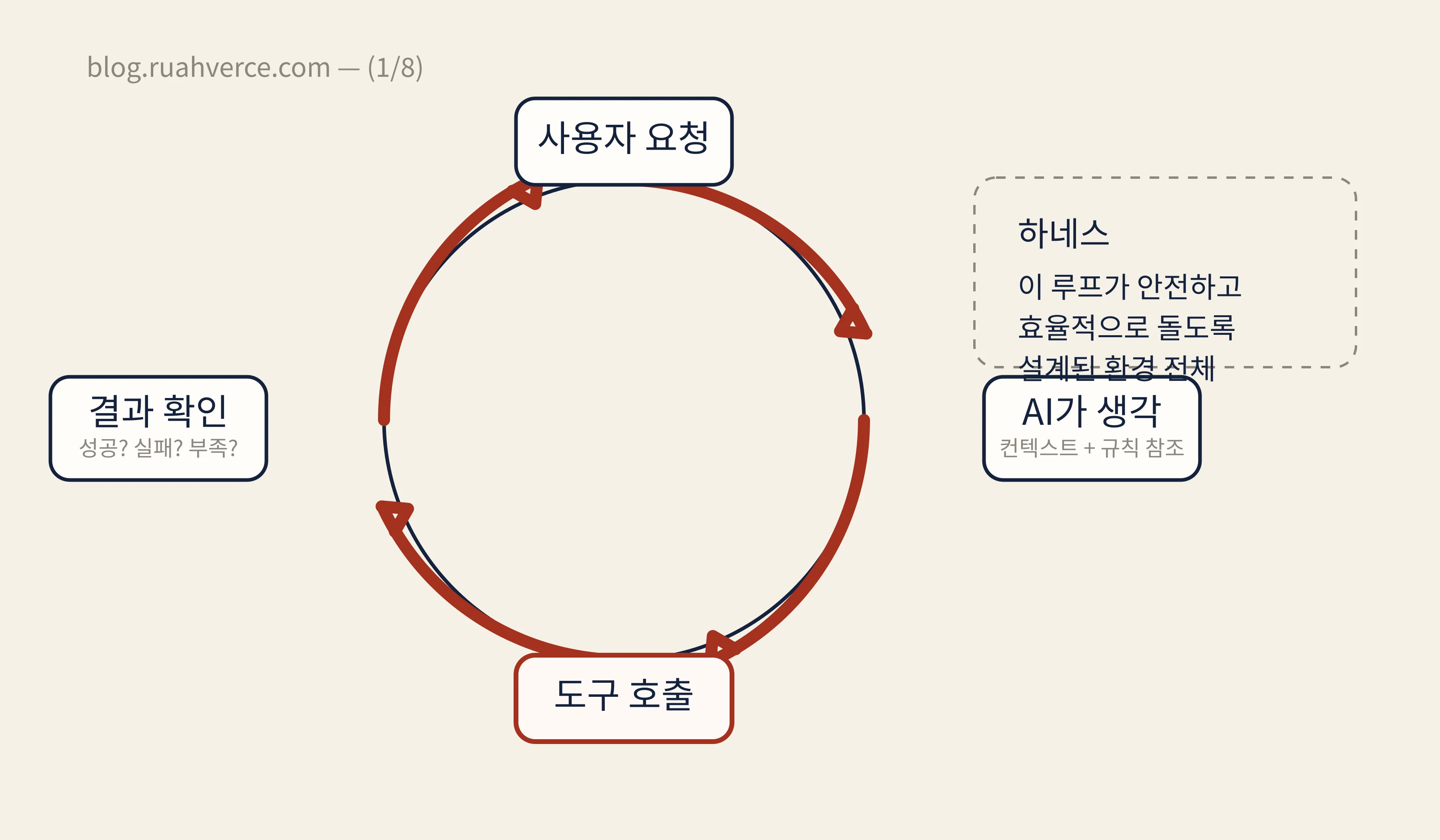
Instead of answering once and stopping, the system repeats reason → call a tool → inspect the result → reason again. Harness engineering shapes the system around that loop so it can run safely and efficiently.
The Seven Axes: A Roadmap for the Series
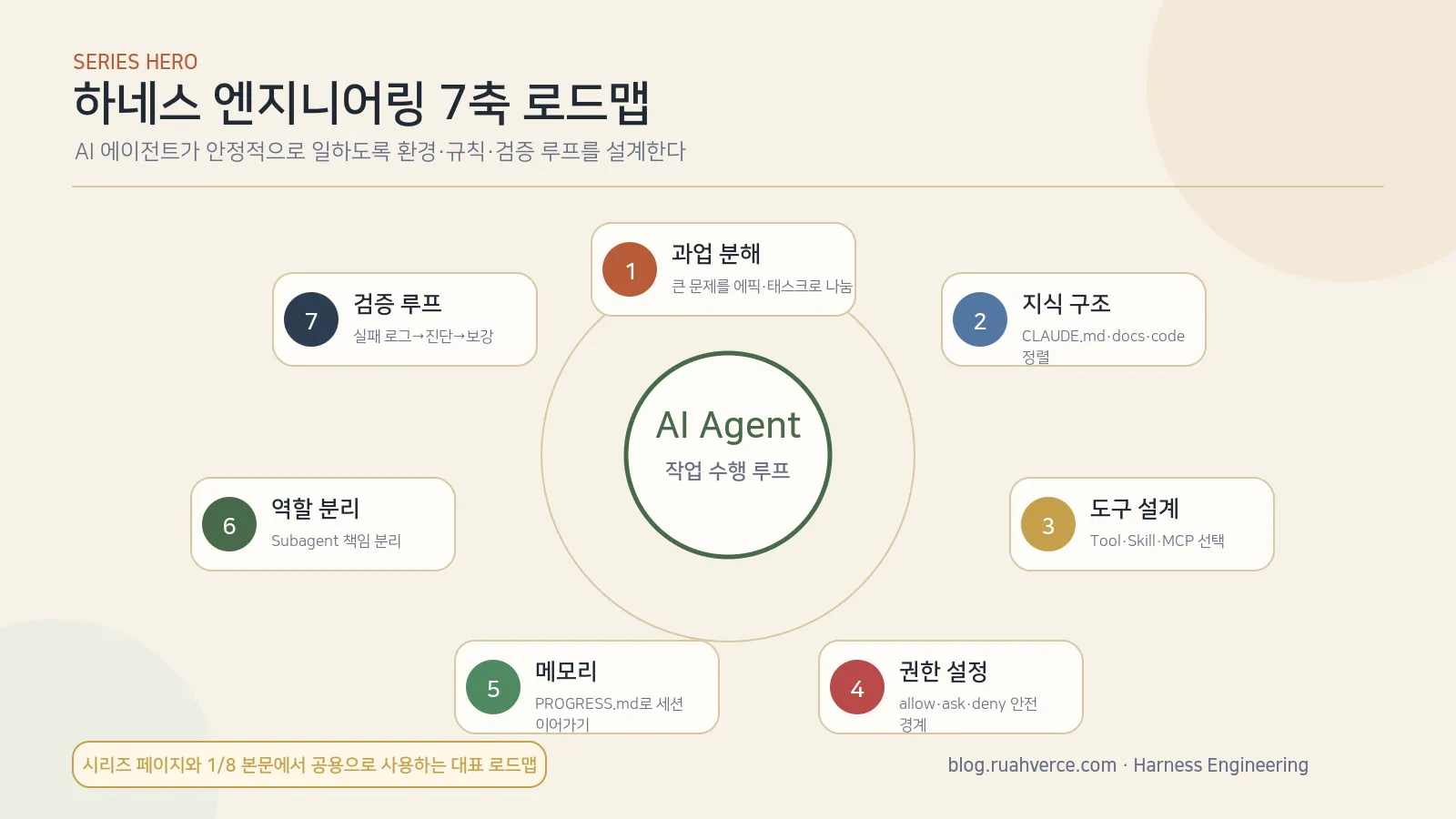
The diagram currently retains its Korean labels; the seven axes are translated in the table below.
Seven recurring design axes appear when building agent environments. Each part of this series focuses on one of them.
| # | Axis | In one sentence | Key terms | In this series |
|---|---|---|---|---|
| 1 | Task decomposition | Break large work into controllable units | task decomposition | (2/8) Read (Korean) |
| 2 | Knowledge structure | Build a project map in CLAUDE.md | CLAUDE.md, AGENTS.md | (3/8) Read (Korean) |
| 3 | Tool design | Compose tools, skills, plugins, and MCP servers | MCP, tool use | (4/8) Read (Korean) |
| 4 | Permissions | Automate safely with allow, ask, and deny rules | permissions, hooks | (5/8) Read (Korean) |
| 5 | Memory patterns | Preserve state when a session ends | PROGRESS.md, --continue | (6/8) Read (Korean) |
| 6 | Role separation | Delegate specialized work to subagents | subagent, orchestrator | (7/8) Read (Korean) |
| 7 | Validation loops | Check work automatically through hooks and failure logs | PostToolUse, feedback loop | (8/8) Read (Korean) |
You do not need to perfect all seven at once. A practical path is to start with CLAUDE.md, observe where the agent gets stuck, and feed each failure back into the environment through a validation loop.
Tools Used Throughout the Series
The series compares three agent tools:
- Claude Code — Anthropic’s coding agent, with
CLAUDE.md, allow/ask/deny permissions, hooks, and subagents - OpenCode — an open-source coding agent with
AGENTS.md, modes, and plugins - OpenClaw — a multi-agent gateway with
SOUL.md,USER.md, and workspace isolation
They implement the same underlying ideas in different forms. Comparing them makes the principles of harness engineering easier to see.
Who Needs Harness Engineering?
Anyone working with AI agents can benefit from it, especially:
- Developers using AI coding tools such as Claude Code, Cursor, or Copilot. You already use parts of a harness. Designing those parts deliberately can change the result dramatically.
- Teams building AI agents. A stable agent requires an environment that constrains and supports its behavior.
- People trying to improve AI-tool productivity. Prompt improvements eventually plateau; the next gains come from environment design.
Small artifacts that make the principles inspectable
The Astro deployment record names commits for serving and image-font changes. The validation-loop article (Korean) includes a script that preserves failure signals. These artifacts demonstrate specific boundaries; they are not a controlled measurement of overall agent productivity. The seven axes below are this series’ organizing framework, not a universal standard.
What I Ran Into in Practice
While organizing this series and the blog repository, the first thing I noticed was that better prompt wording did not reduce output variance very much. Draft generation, image rendering, frontmatter validation, and deployment checks all happen outside the model. A small change in any of those procedures could turn the same request into a result of very different quality. The unstable part was not the prose of the answer. It was the absence of fixed answers to what the agent should read, what it may edit, and how the result must be verified.
I therefore fixed the repository instructions, series structure, image-asset rules, and build-validation order first. After that, obtaining similar quality repeatedly became much easier than obtaining one exceptional answer. For me, harness engineering is less about writing a better prompt and more about designing a working environment that produces stable behavior when the same kind of request returns.
Frequently Asked Questions
Q1. How is harness engineering different from prompt engineering?
Prompt engineering focuses on what to say to the AI. Harness engineering covers the whole environment in which the AI works: which files it may read, which tools it may use, what it remembers, and which actions it may run automatically. The prompt is one component of the harness.
Q2. Does harness engineering apply only to coding agents?
No. Coding agents such as Claude Code and Cursor currently expose these ideas most systematically, but the principles apply to data-analysis, customer-support, and research agents as well. Every agent needs an environment.
Q3. Must I configure all seven axes before I begin?
No. Three useful lines in CLAUDE.md and a basic permission policy are enough to start. Add another layer only when you observe a concrete failure. Part 8 on validation loops (Korean) develops this process in detail.
Q4. Can I apply this to tools other than Claude Code?
Yes. The series compares Claude Code, OpenCode, and OpenClaw. File names and configuration formats differ, but the seven axes remain the same.
Q5. How much investment does it take to see a return?
In my experience, roughly three to five initial hours are enough for a 50-line CLAUDE.md and a basic allow/ask/deny permission policy. That baseline already prevents many repeated mistakes. Building out all seven axes is better treated as an incremental two-to-four-week process.
Q6. Where should a team begin?
I recommend individual experiment → shared CLAUDE.md → team permission template → subagents. A simultaneous team-wide rollout can create more rule-writing overhead than value. Adoption is smoother when one person establishes a working pattern first.
Takeaways
- Harness engineering designs the complete environment outside the AI model, not just the prompt.
- The central mechanism is the agent loop: reason → call a tool → inspect the result → reason again.
- You do not need all seven axes at once. Start with project knowledge, then reinforce the axis exposed by each failure.
Read Next
- (2/8) Task decomposition for AI agents (Korean) — four ways to break down large work safely
- (3/8) A guide to
CLAUDE.md(Korean) — a three-layer approach to project knowledge - (8/8) Designing validation loops (Korean) — strengthening a harness with failure logs and hooks
References
Reader questions
읽으며 남긴 질문
글을 읽으며 붙잡아 둔 질문입니다. 다시 살펴보거나, 보내지 않은 질문을 한 번에 블로그 주인에게 전달할 수 있습니다.